Windows app for local prospecting
Find businesses,city by city.
Look up businesses from a public source, see where each record came from, review the details and export the shortlist you keep.
- Windows 10 or 1164-bit
- Your ownsearch service
- Your data stayson your PC
- No cloud, no accountNo recurring fees
You connect your own search service. The $29 license covers the app, not the search service.
City boundary
Published businesses
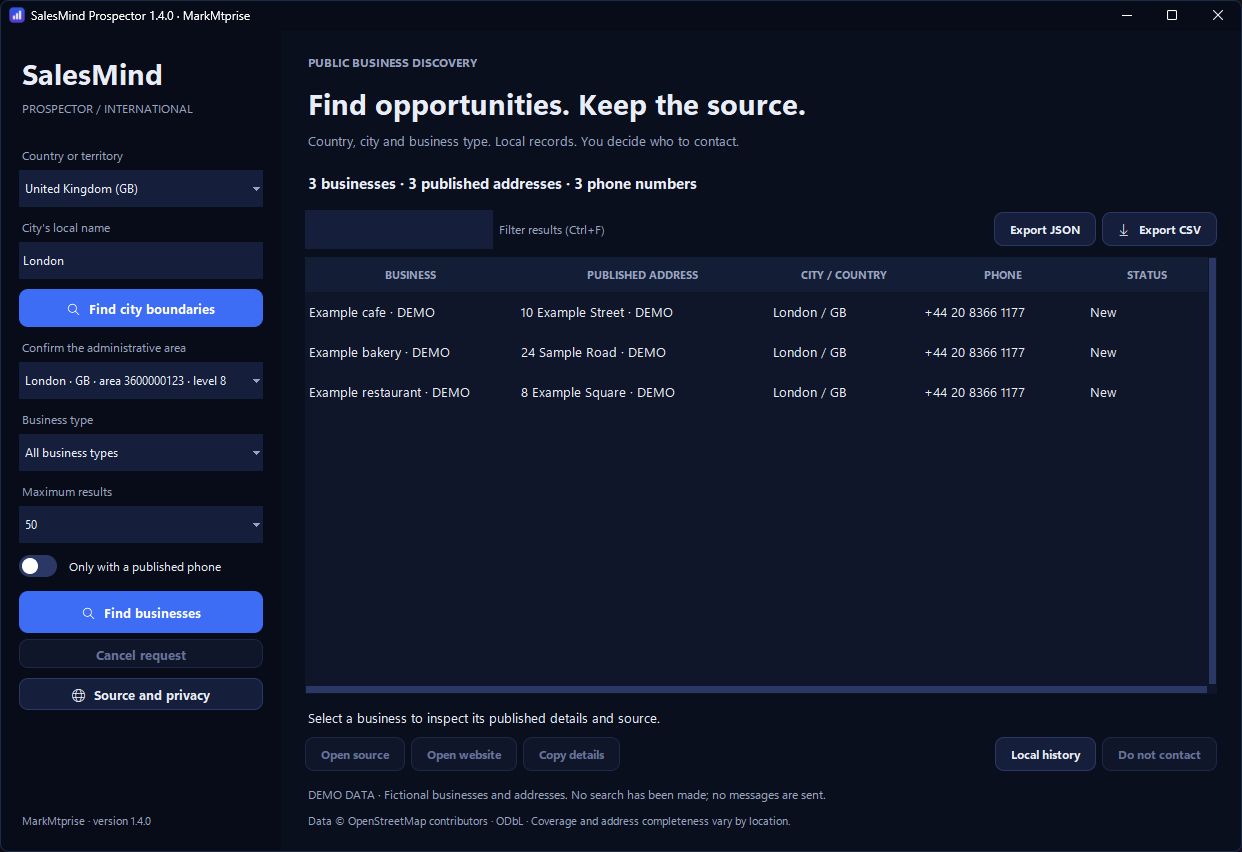
The app itself, version 1.4.0, in its built-in demo mode. Every business shown is fictional. Illustration of the idea: one confirmed city boundary and the records inside it. Not a map of a real place, and not a claim about coverage.
01
Choose a city
Type the city name and confirm the exact boundary.
02
Find businesses
Pick a business type and a limit for the search.
03
Review the results
See each record, its source and published details.
04
Keep, mark, then export
Mark businesses as Do not contact and export your list.
Try it on sample data
Pick a city, filter the list, mark a business Do not contact, then export. Everything here is fictional and never leaves this page.
| Business | Published address | City / country | Phone | Status |
|---|
No businesses match this filter. Clear it to see the sample again.
Select a business to inspect its published details and source.
Know what you are getting
Every record with its source.
Each business shows the published address, phone number, website when available, and where it came from. You stay in control of what goes into your list.
Example Bakery
Bakery- Published address
- Example Street 12, 1000-000
- City / country
- Riverside / US
- Phone
- Not published
- Website
- example-bakery.example
- Source
- Demo record 2001
- Collected
- 24 Oct 2026
- Status
- New
Mark as Do not contact
Built for practical work
A focused tool for real use cases.
- Small agenciesBuild a list of cafés in a town you are pitching.
- FreelancersLook at local businesses one city at a time.
- Local sales teamsReopen last week’s search and export to a CRM.
- Check a websiteOpen the site before the first call.
- Skip businessesMark as Do not contact; they leave every export.
- Remember the sourceSee where each lead came from and when.
- Work with published numbersOnly numbers the source lists publicly.
Not built for: crawling a whole country in bulk, sending messages for you, or verified contacts.
Set up in four steps
The license is the software. The search service is yours to connect, and the app tells you where.
01
Install on Windows
Extract the ZIP to a folder you can write to and open SalesMind Prospector.exe. Windows 10 or 11, 64-bit. There is no account to create. The executable is not code-signed yet, so Windows may ask you to confirm before it opens.
02
Enter your activation code
The commercial edition asks for your individual code the first time you search. It is checked on your PC, offline.
03
Connect your search service
Open Source and privacy and add an HTTPS search endpoint you are authorized to use. The license does not include one.
Prospector queries the Overpass API, the read service for OpenStreetMap data. Use your own Overpass instance or a provider whose terms allow your workload. Public community servers are shared and promise no uptime: fine for a light test, not for regular commercial use. Any provider costs are paid to the provider.
04
Run your first search
Choose a country, type the city’s local name, confirm the right boundary, pick a business type and a limit of 25, 50, 100 or 200 results, then Find businesses.
Simple pricing
One licence, paid once.
$29one-time payment
USD, planned launch price
Purchase is not open yet. Email us and we’ll tell you when it is.
Opens your email app. Nothing is sent until you press send.
- Windows desktop app for one person
- Updates included during the product’s lifetime
- Search service and its costs not included
- No tracking, no automatic uploads
- No account to create
Results depend on what your search source has published. No number of contacts is promised.
Questions
Frequently asked questions
What does the license include?
The Windows desktop app for one person, with updates released under the individual plan for the product’s lifetime. It does not include a hosted search service, a contact database, lead credits, custom work or any third-party subscription. The price is $29, paid once.
Do I need to set up a search service?
Yes. Prospector asks for an Overpass-compatible HTTPS endpoint you are authorized to use: your own instance or a provider whose terms allow your workload. Provider costs, if any, are separate. Community servers have shared capacity and no uptime promise, so they suit light testing, not regular commercial use.
Will it find every business in any city?
No. The country selector has 249 ISO entries, but that is a list, not a coverage promise. Results depend on what your source has published for that municipality; some businesses, addresses, phones and websites will be missing. Each search returns a limited sample of 25, 50, 100 or 200 results.
Are addresses and phone numbers verified?
No. The app shows what the source publishes and formats phone numbers for the country. It does not check that a number is active, who owns it, whether it uses WhatsApp or whether the business agreed to be contacted. Missing details stay missing; nothing is filled in.
Does it send messages automatically?
No. The international workspace sends no outreach of any kind. A business’s website or source opens in your browser only when you click it.
Where is my data stored?
On your PC, in your Windows user profile: search history, records, Do not contact marks, preferences and your activation code. There are no analytics and no automatic uploads. The contact database is not encrypted by the app, so your Windows account and disk protection matter.
Does it run on Mac, a phone or in a browser?
No. Windows 10 or 11, 64-bit only. There is no Mac, mobile or web edition.
Can I export my records?
Yes. The list currently shown exports as CSV or JSON, with each record’s source and collection date. Records marked Do not contact are left out. Review exports before sharing them: a published phone number is not consent to unsolicited messages.
How do activation, updates and refunds work?
The commercial build checks your signed activation code on your PC, offline. Updates released under the individual plan are included. Refunds follow the terms of the store you buy from; that store will be named here when purchase opens. A refunded code loses its entitlement to use, support and updates.
How do I get support?
Email Vincius202020anos@gmail.com with what happened and your Windows version. Never attach your activation code, your data folder or exported contact lists.
See it work first
The demo above runs the whole workflow on sample data. Questions about the app or the license go to the support address below.